The DiaCare app

Plan your day.
Stay supported.

Illustration of a woman checking DiaCare from her sofa at home
DiaCare app home screen with meals and daily tracking
Lifestyle illustration · Actual app screen

Plan meals, track food and medication, and message your pharmacist—all in DiaCare.

See the app

Available in English & Arabic.

The DiaCare experience

Built around you.

More than a food log.
Your everyday companion.

A personal plan, a place to track your day, and a pharmacist to talk to. Together in DiaCare.

Take a closer look
Personal meals with nutrition details and meal swaps
Your meals
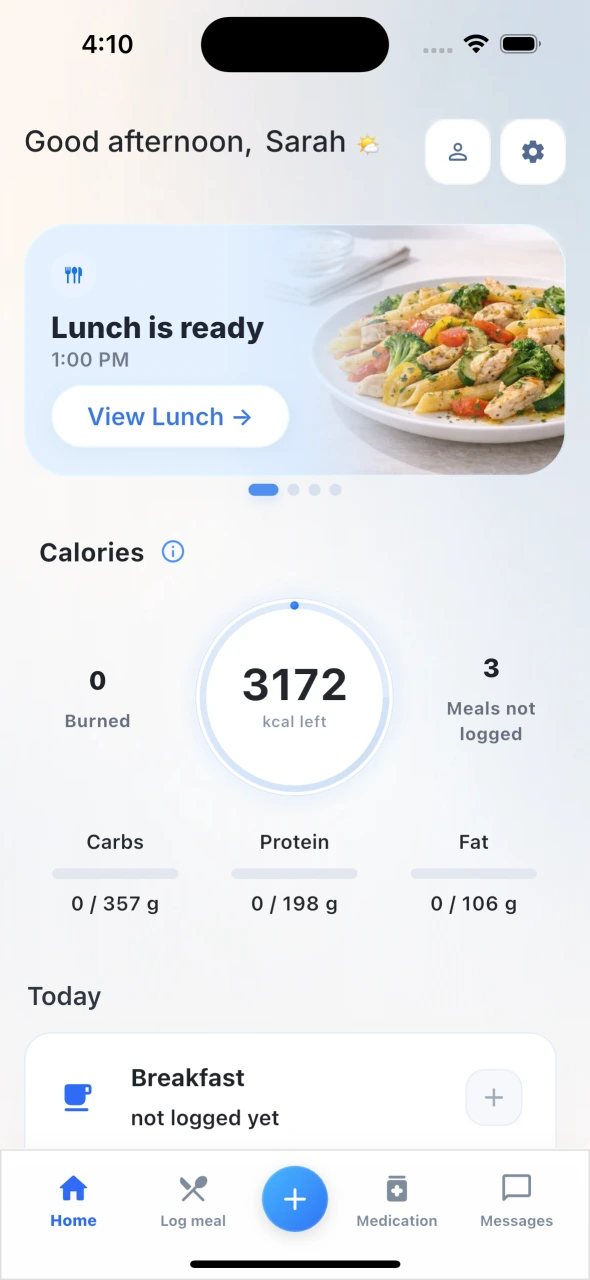
Daily dashboard showing meals, steps and nutrition targets
Your daily view
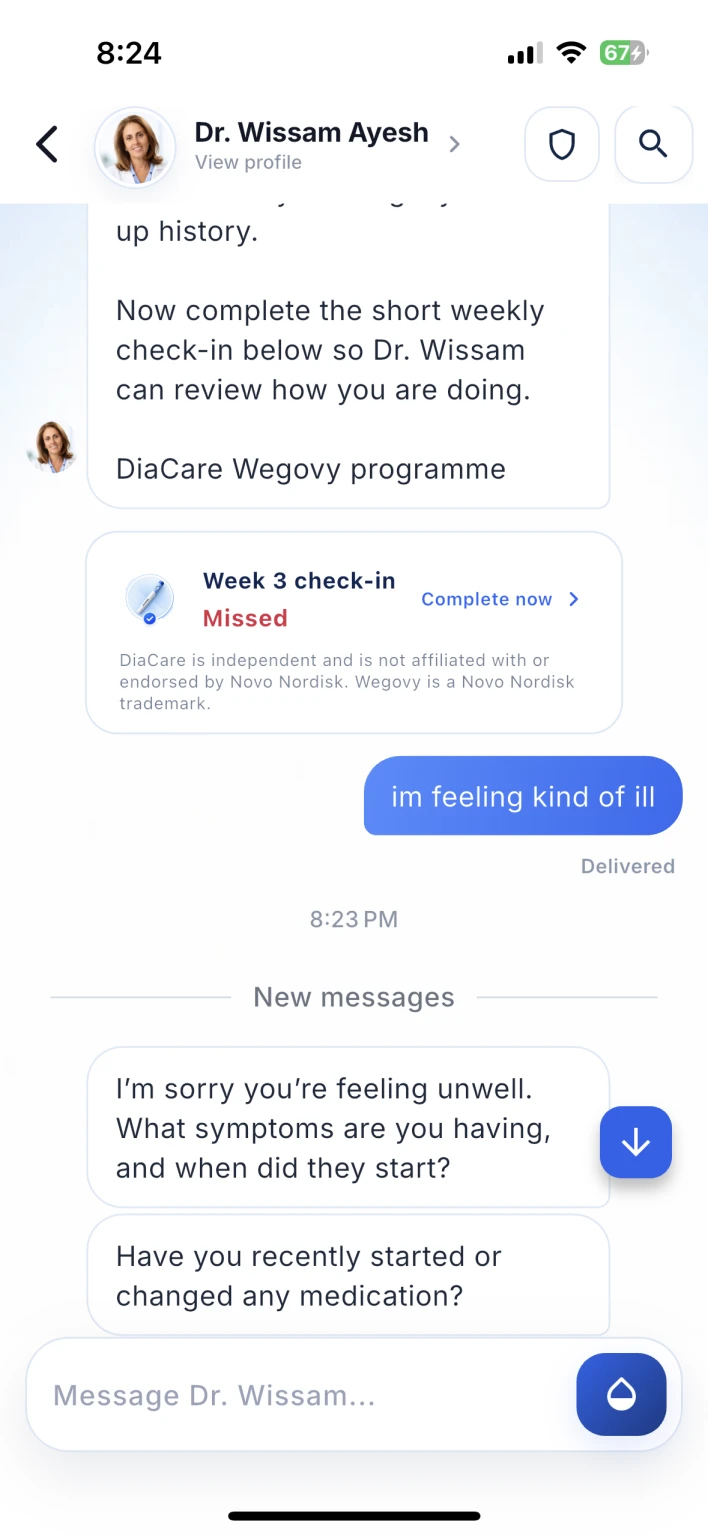
Demo exchange between a patient and their pharmacist
Your support · Demo conversation

Actual app screens · Example data

01 / Your personal plan

Your goals.
Your kind of food.

A meal plan made for you, with personal nutrition targets. Swap a meal to suit your day.

CaloriesProteinCarbsFat
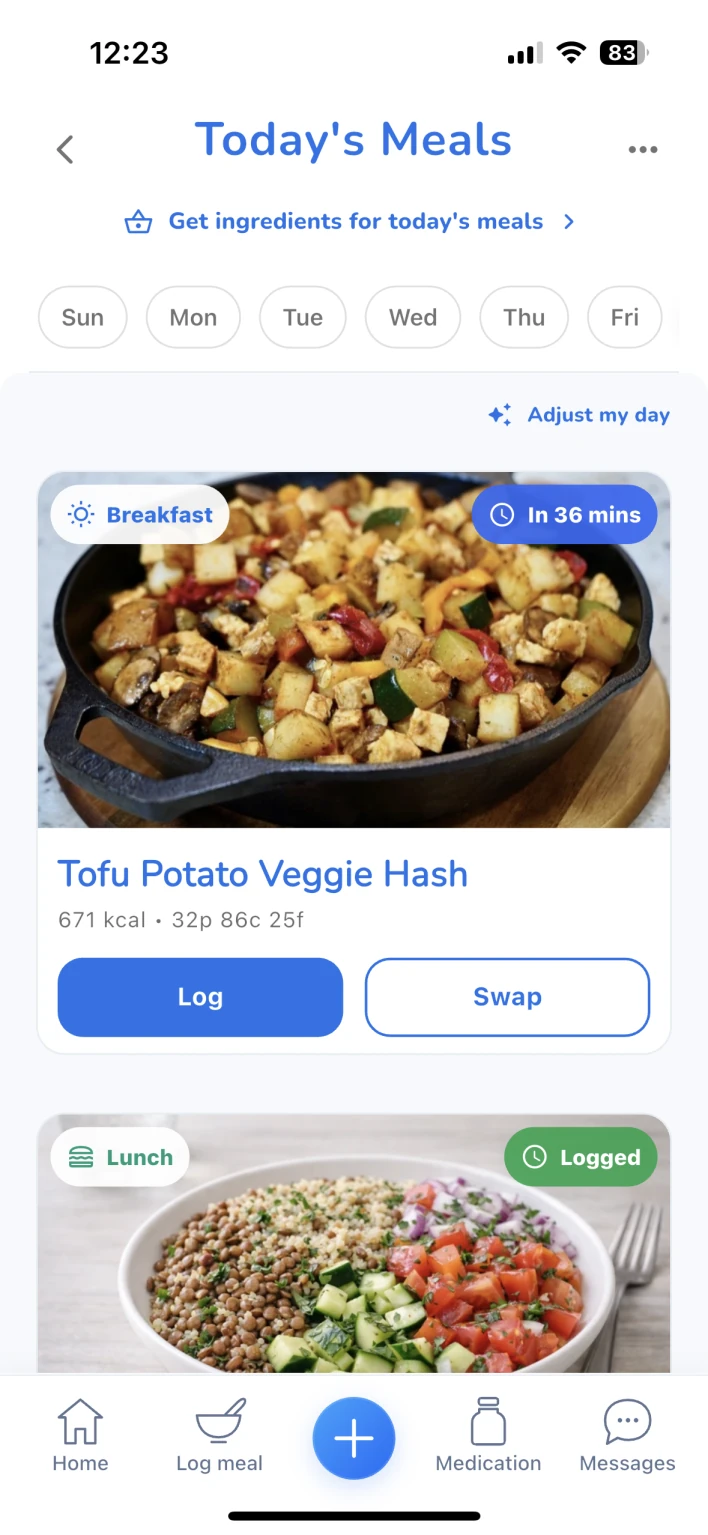
Personal meal plan with nutrition details and options to log or swap a meal
Actual app screen
Built for real life

Your goals, food preferences and cooking time help shape your plan—not a one-size-fits-all menu.

Less “what should I eat?”
Start with meal ideas and nutrition details already in your plan.
Room for a different day
Swap a meal when your appetite, schedule or preferences change.
From your plan to your plate

Enjoy your meal. Then make keeping track the easy part.

02 / Less typing

Snap. Review. Log.

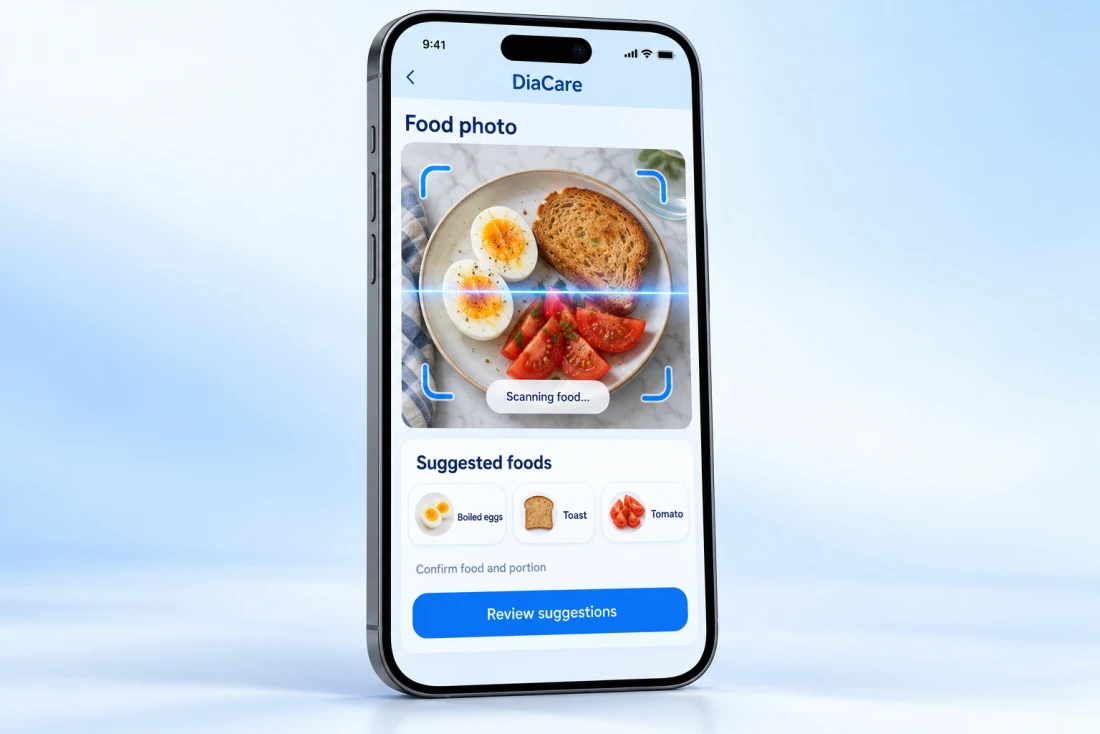
Take a meal photo. Confirm the foods and portions, then log. Search and manual entry work too.

Illustration of photo logging: a meal photo, suggested foods, and a review step
Feature illustration
You stay in control

Photo suggestions are a starting point, not a final answer. Check the foods, adjust portions, then save to your daily log.

  1. Take a photo
  2. Review suggestions
  3. Save your meal
Your food, your way
Use a photo, search for foods or enter a meal manually.
See where it fits
Bring what you eat into your daily calorie and nutrient view.
And when you have a question

You don’t have to make sense of everything alone.

03 / A real person

Not just tracking.
A conversation.

One-to-one chat with your pharmacist. Ask questions and get ongoing support in the app.

Dr. Wissam AyeshPharmacist & diabetes educator
Example conversation: a patient feels unwell and Dr. Wissam asks about symptoms and medication changes
Demo conversation
Support beyond the numbers

Ask about your meals, medication or how you’re feeling. Keep the conversation in the app and return to earlier messages when you need them.

A real person to ask
One-to-one pharmacist support—not just another dashboard.
A conversation you can return to
Keep your questions and replies together, in English or Arabic.

Pharmacist replies when available. Not live or emergency care. Meet Dr. Wissam →

See your day clearly

Small steps.
One clear view.

Keep meals, nutrients, medication and activity in one place.

Personal nutrition
See daily calories and nutrient targets.
Medication tracking
Log doses and set reminders.
Activity planning
Follow your plan and track activity.

And your meal plan can make your grocery list, too.

Explore all features
DiaCare daily dashboard with meal plan, steps, calories, and carb, protein and fat targets
Actual app screen · Example targets

Explore the smarter details

Less input.
More understanding.

Choose a feature to see how DiaCare turns everyday information into something you can use.

Choose an app feature

PERSONALIZATION / YOUR INPUTS MATTER

Built around your life.
Not just a calorie number.

Your goals, food preferences and available cooking time help shape your meal plan. See nutrition details, then swap a meal when your day changes.

Goals & preferencesPersonal mealsNutrition targets

The useful partA starting point you can adapt, rather than a blank page at every mealtime.

See personal meals
Example personal meal plan with log and swap controls
Actual app screen · Example plan

PHOTO ASSISTANCE / YOU CONFIRM

A photo starts it.
You make it accurate.

Photo logging suggests foods from your meal image. Review the suggestions and portions before saving—because a photo alone doesn’t tell the whole story.

Meal photoFood suggestionsYour confirmation

The useful partLess typing, with the final choice still in your hands. Search and manual entry are available too.

See photo logging
Feature illustration showing food photo suggestions and review
Feature illustration · Not a live scan

DAILY CONTEXT / ONE PLACE TO LOOK

See the details.
Keep the bigger picture.

Your daily dashboard brings meals, calories, nutrient targets and activity together. Medication logging and reminders help keep your routine organized alongside them.

Your entriesDaily totalsA clearer overview

The useful partA way to see how your day is coming together, without opening several different trackers.

Explore tracking
Example dashboard with meals, calorie and nutrient targets and activity
Actual app screen · Example data

Interactive feature walkthrough · Illustrative examples, not a live account or medical advice.

Fits into your everyday

A little less effort.
A clearer next step.

You don’t need to do everything at once. Start with one meal, one entry or one question—and build a routine that works for you.

  1. Before your day

    Have a starting point.

    Open your personal meals and see what’s planned. Change a meal if something else suits you better.

    Explore your plan
  2. As life happens

    Keep it simple.

    Log what you eat, record a dose or track activity. Keep the details in one place instead of juggling separate notes.

    See easy logging
  3. When you need support

    Ask. Don’t guess.

    Message your pharmacist with a question and come back to the conversation when a reply is available.

    See your support

Beyond the basics

More tools.
Less juggling.

From health trends to your next shopping list, DiaCare helps organize the details around your daily plan.

Health tracking & reports

See more than today.

Log blood sugar, weight and water. View trends and share summaries.

Blood sugarWeightWater

Optional sync for supported Apple Health data on iPhone.

Explore health tracking →
Grocery planning

Your meals.
Your shopping list.

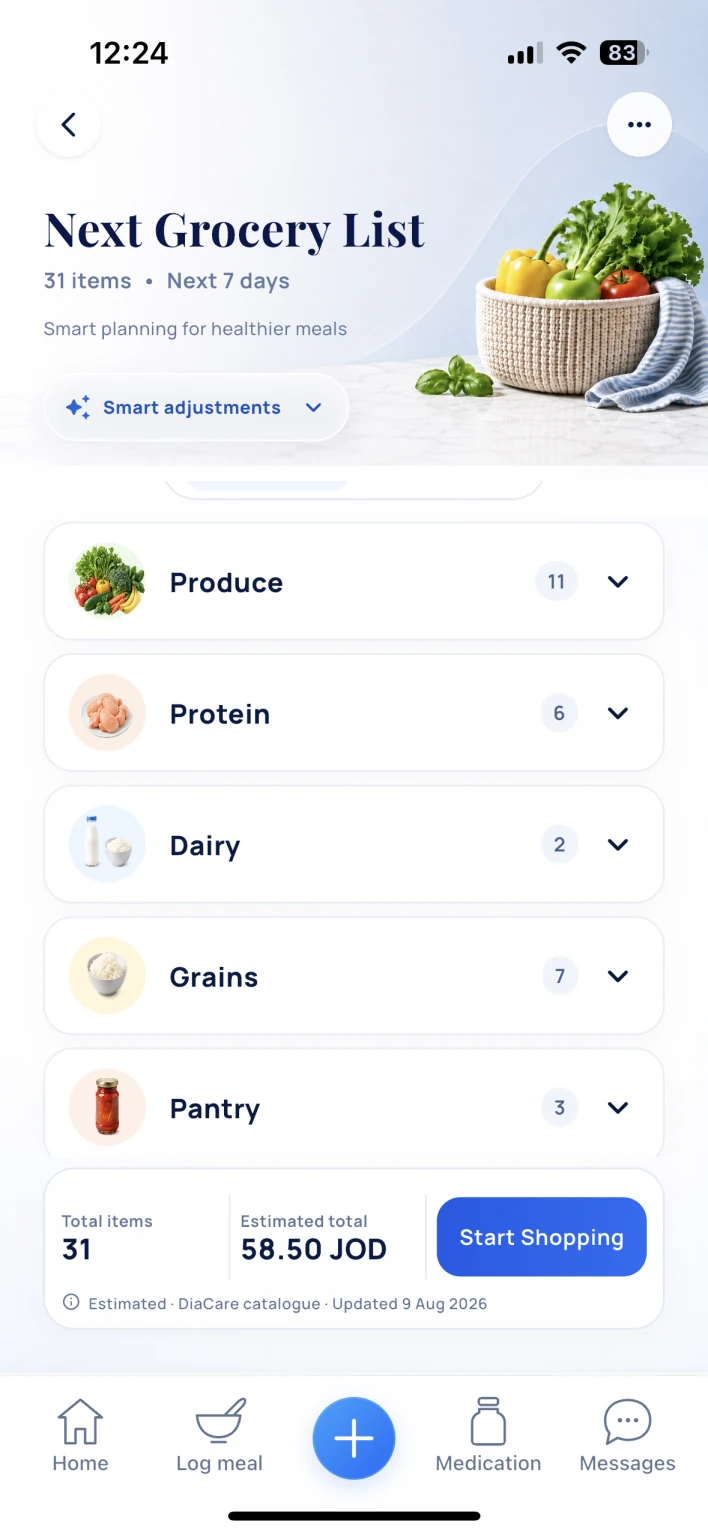
Lists based on your meals, preferences and household needs.

Explore grocery planning →
DiaCare grocery list organized by food category
Actual app screen
English & Arabic

Care in your language.

Use DiaCare in English or Arabic, with personal plans and pharmacist support in one place.

Englishالعربية
See all app features →

Your next step

Ready to start?

Ask about app access. We’ll explain your options and any fees.

Ask about app access

DiaCare does not replace your doctor or provide emergency care. For emergencies, contact local emergency services.